


Tag: PC
Just Cause 2 Multiplayer Server Banners & Updates.
by Darwood37 on Feb.22, 2014, under Games, General, PC
The server banners for Just Cause 2 multiplayer have finally been updated by Gametracker.com and seem to be working again.

We have been working on some additions to the server. A full featured buy menu that allows dual-wielding weapons. This is only functional on the client side of the game which means no one else can see you walking around with a weapon in both your left and right hands but it looks really cool.
As well as your character or model ID being saved and re-applied on server rejoin your weapons will also do the same.
We have added a vertical take-off and landing mod for the Si-47 Leopard and the F-33 DragonFly. The script was written by JasonMRC over at ProblemSolvers.
Now when you fire on an enemy you will see a hit marker that shows up in the form of a red X.
The minimap that is located on the top left of the screen has been updated to show player locations. The smaller the marker the farther away. You have the option to remove yourself from the minimap so that other players cannot see where you are, type /minimap in chat to toggle it on and off.
If you have not done so yet or have not been on in a while head on over to our Just Cause 2 multiplayer server located at jc-mp.gaveroid.com:7777 and explore.

Gaveroid TeamSpeak 3 Server now up!
by Gaveroid on Jan.05, 2014, under Games, General, PC
We have recently opened up a TeamSpeak 3 server, to go along with our Just Cause 2 Multiplayer server! If you’d like to go check it out, the server is located at teamspeak.gaveroid.com. You should drop in for a few minutes if you can!
Here’s a bit more about TeamSpeak 3.
TeamSpeak, a freeware gaming chat client originally released in October of 2001, is a popular way for gamers to voice chat with each other in games. Although it’s not marketed as such, it’s even useful for non-gaming situations. Unlike most chat/IM programs today (such as Skype, XFire, Yahoo Messenger, etc.), TeamSpeak requires a server to be set up, rather than using the more popular P2P method. The advantage to this is, game server owners can host their own TeamSpeak servers for users to chat on while playing. Some games have poor, or no voice chat at all, so TeamSpeak is a popular option.
TeamSpeak 2 was released a few years later, expanding upon the program, and introducing many new features. Instead of being distributed as an update to the original TeamSpeak client, it was released as a seperate download. This was because so many people still had their servers set up for the original version. That way, they wouldn’t have to setup their server all over again if they didn’t want to, as there were many changes added in TeamSpeak 2. TeamSpeak 2 offered users an address book (what is now the Bookmarks list), a public server browser, the ability to have multiple channels in a server, moderation utilities, better sound quality, and much more. TeamSpeak 2, although being replaced by TeamSpeak 3, is still available for download (TeamSpeak 1 has been discontinued, however).

TeamSpeak 3 was eventually released, bringing better voice quality, 3D sound virtualization, improved security, more customization (skins, scripting, etc.), and much more to the table. TeamSpeak 3 is the most popular version, being the most up-to-date. The 3D sound, although in reality slightly gimmicky, allows you to change the position of those in your channel. For example, while having a meeting about the server, you can place everyone in a different spot in a “round table” formation.
Today, TeamSpeak is still one of the most popular gaming voice-chat solutions. It has many competitors (including Mumble and Ventrilo, very similar programs), but it is still the one that most gamers prefer. Click here to learn more about TeamSpeak 3.
Download TeamSpeak 3

Gaveroid Official Steam Group
by Gaveroid on Dec.15, 2013, under Games, General, PC
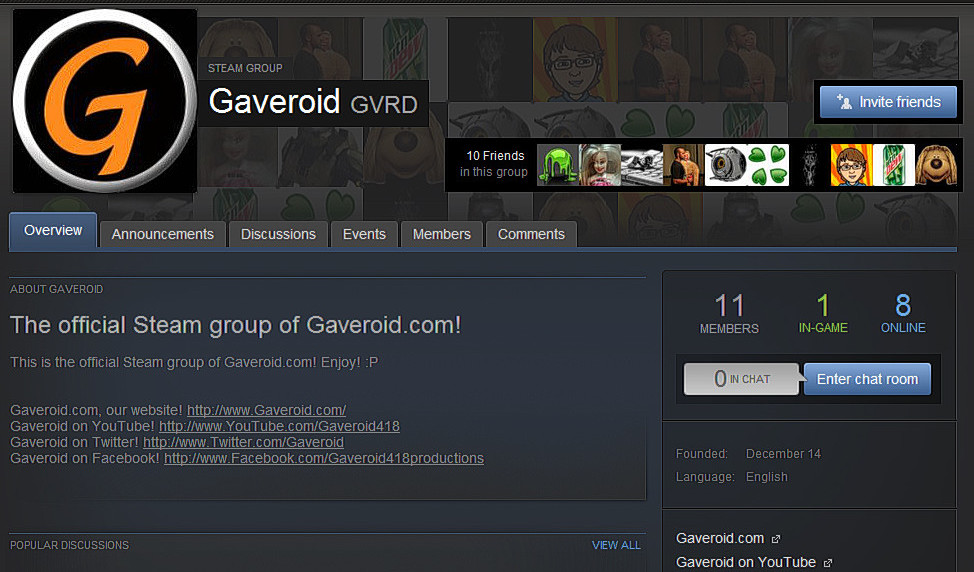 I’d like to introduce to you the new Gaveroid group on Steam! If you join the group, you can be alerted with announcements about when we’re going to have a community gaming session, and more! You can also hang out with us in the group chat room, and ask about the website and such.
Hop on Steam, and join the Gaveroid group today, at this link!

-
Hi! Welcome to Gaveroid!
A geek with a dog and a blog
Thanks for dropping by! Please feel free to look around.
Stay updated by subscribing to our RSS feed.
Gaveroid on Instagram

discord.gaveroid.com









You must be logged in to post a comment.