


Archive for 2013
Fraps: Real-time video capture and benchmarking software
by Darwood37 on Jul.20, 2013, under Games, General, Movies, PC
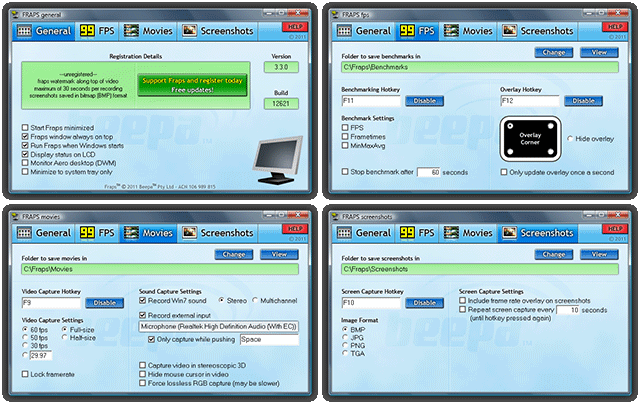 Fraps is a Windows application that can be used with games, but not limited to, using DirectX or OpenGL graphic technology. To capture real-time gameplay, screenshots and also provide some benchmarking.
I recently downloaded Fraps and while i have not used the screen capture or benchmarking options I have made very good use of the real-time video capture. All movies are recorded in outstanding quality and are saved slightly compressed in the AVI format. Fraps can capture audio and video up to 7680×4800 with custom frame rates from 1 to 120 frames per second.
Fraps in not just limited to game capture. You can also capture your desktop, this opens up a whole world of possibilities, just use your imagination.
If you want to edit your movies with Vegas Pro, Windows Movie Maker or one of the many other video editing software titles available i recommend running the original AVI through a converter and saving it as a WMV. Remember if you want to share the video with anyone in the original AVI format they will have to have Fraps loaded on their computer because it uses a custom codec.
I highly recommend this software, you can download the free version at www.fraps.com wich only records 30 seconds of video or pay $37 for a single user license, well worth every penny.

VIDEO: Call of Duty is Too Hard Nowadays
by Gaveroid on Jul.18, 2013, under Games, General, YouTube
In this video, I talk about how Call of Duty has gotten much harder for casual players like myself – and I don’t like it.
Don’t forget to comment, rate, and subscribe! 🙂
-by Gavin Trutzenbach

Adobe After Effects and Premiere should merge into one
by Gaveroid on Jul.16, 2013, under General, PC
 Have you ever worked in Adobe After Effects and Adobe Premiere? If you used both of them on one project, you’ll probably notice that you’ve had to export/render and hop between programs. In my opinion, this is unacceptable. There should be a universal project file – even better, they shouldn’t exist seperately. They should be one program.
Let me quickly say, I only have worked with AE and Premiere CS2 and CS3. I haven’t touched any other versions, so I apologize if I am incorrect and if AE and Premiere in fact do have this feature. If that is the case, thank you for your understanding. It’s still a good article in my opinion, so still stick around and read it! 🙂
I mean, Sony did it with Vegas. Vegas includes special effects, while still being a video editor. With such a premium price for Adobe’s video editing suite, you’d expect for them to make the process easier.
Bottom line – why did Adobe make them seperate programs? If you remember, in the old versions of Photoshop (pre-CS3) you used to get Photoshop and ImageReady. ImageReady was for processing web image files (GIF, PNG, etc.). It was just like Photoshop – except it was more towards image design rather than photo editing. However – the transition was easy from PS to IR. You just hit a button in the file menu, and your project was in the opposite program. IR would even read PSD files (Photoshop project files) I believe, so that was another example of how extremely easy it was to transition between the two image editors.
However, Adobe later dropped ImageReady and implemented all of ImageReady’s features into Photoshop – starting with CS3. ImageReady went the way of the dodo – but it’s features were integrated with Photoshop.
Why can’t Adobe do this with AE and Premiere? Why not just merge AE into Premiere? Why not just click a button and have your project in the opposite program like in PS and IR – even if you don’t merge the programs into one, is a simple way to transfer project files too much to ask? Like I said earlier – they did it with Photoshop and ImageReady. Or, even if you can’t do that, make a universal project filetype – or make the programs compatible with the other’s project files.
If you had to keep exporting/rendering multiple times, your quality would probably diminish after being processed so many times.
In my opinion, it’s sad that Adobe can implement so many great features with AE and Premiere (motion tracking in AE, etc.), but when you’re expected to use them together, they don’t have an easy way to transition from program to program – especially when they did it before with Photoshop and ImageReady.
-by Gavin Trutzenbach

-
Hi! Welcome to Gaveroid!
A geek with a dog and a blog
Thanks for dropping by! Please feel free to look around.
Stay updated by subscribing to our RSS feed.
Gaveroid on Instagram

discord.gaveroid.com







You must be logged in to post a comment.